Give customers a reason
to come back.
Connect your product catalog or loyalty system to your email images. A Data Store lookup or Web API response supplies the product, price or balance each customer sees.
Full Data Stores and External Web APIs are on Enterprise. The trial includes two limited Data Stores for Rule Sets. Compare plans
Data Store Product catalog
| Product ID | Name | Price |
|---|---|---|
| TR-014 | Ridge walking boots | $128 |
| TR-015 | Summit trail shoes | $96 |
Product ID = TR-014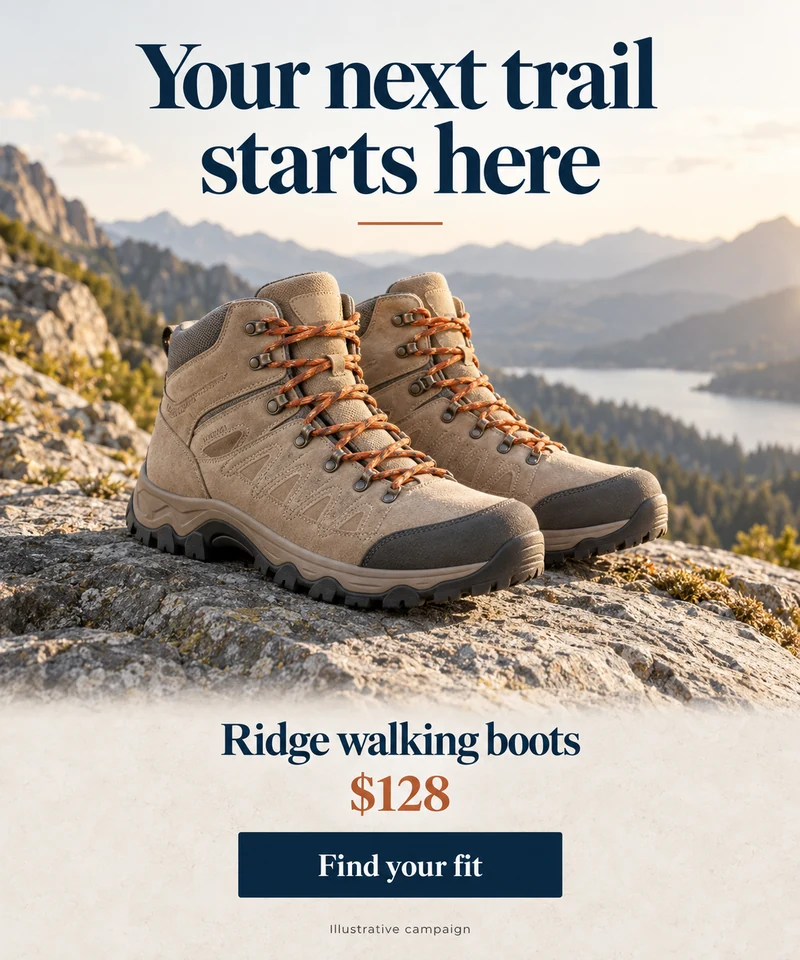
Put your product data
to work in email.
The illustrative catalog lookup selects product TR-014. Its name and $128 price fill the matching fields in the image. Your source can supply the product photo too. Select a different record to reuse the design for another product.
Trendhim used access to its data source to customize product recommendations in its email automation.
“It made it a lot easier for us to personalize and tailor our automated emails.”
Show how close they are
to their next reward.
A loyalty reminder gives a member a concrete reason to visit again. Connect the customer's record to show their points balance and how much remains until the next reward.
The example Web API response supplies Maya's name, 420-point balance and 500-point reward threshold. The image displays the balance and calculates the 80 points she still needs.
Pass a customer identifier through your email platform's merge tag to find the right record. The identifier selects the customer; it is the configured Data Source that supplies the balance.
Explore progress chartsWeb API response Loyalty account
{
  "memberId": "1042",
  "name": "Maya",
  "points": 420,
  "rewardAt": 500
}
Start with the data
you already have.
Upload a CSV export from Excel, Google Sheets or your CRM into a hosted Data Store. To retrieve JSON data from a system you use, configure an External Web API.
This illustrative Data Store animation looks up member 1042. When Maya's stored points change, the next image request uses the updated balance to show her progress toward a reward.
The changes represent separate image requests. They do not animate inside a delivered email, and email caching can delay updates.
Choose how your
data reaches the image.
Both options supply fields to the image editor. Choose based on where you keep the data and how you want to update it.
Keep a table in NiftyImages
Use a Data Store for product catalogs, customer records or event schedules. Upload a CSV or define the fields yourself, then save a query to find the records your image needs.
- Match records by customer ID, category or another field.
- Filter and sort lists, such as upcoming events.
- Update existing records with a unique identifier.
- Choose how long records remain in the store.
The image uses the records you last imported or updated. Full Data Stores are on Enterprise. Scale includes two limited stores for use in Rule Sets.
For automated updates, store-scoped API keys can update their assigned stores. Account-level API access, Store MCP and Zapier writes are available on Enterprise.
Retrieve data from an external system
Use an External Web API for a product feed, loyalty system or sports service that returns JSON. Map the response into fields such as price, points or image URL.
- Use recipient variables in a real-time API request.
- Poll a shared feed on a schedule you choose.
- Map a single record or items from a list.
- Use calculated fields or optional JavaScript transforms.
External Web APIs are on Enterprise. Real-time calls can use response caching; polling uses the most recently retrieved response.
Plan for how often values change
Connected data is used when NiftyImages handles an image request. Your import schedule, API response cache or polling interval affects freshness. Email apps can also reuse cached images, so reopening an email does not guarantee a fresh balance or price.
Connect once.
Design around the details.
Use the same editor workflow for either source. Your data supplies the values; your image layers control the fonts, colors and layout.
Beyond products and points, you can show the next event, a regional store's details or a team's score using the matching records.
Choose a source and a query
Select your Data Store query or API list. If it returns multiple items, choose which item to show.
Map fields to the image
Connect a field such as product name, price or image URL to its layer. Preview sample records and check missing values.
Test it in your email
Add the image URL to your email. For recipient-specific queries, your platform must support merge tags inside image URLs. Send a test and check the rendered details and destination links.
Make your next email
worth coming back for.
Start with one useful detail, such as a reward balance or a product recommendation, and build an image around it.
Create an accountThe trial includes two limited Data Stores for Rule Sets. Full Data Stores and External Web APIs require Enterprise.
"points": 420